Two Most Important Software Architecture Principles

When talking about software design architecture, there are many principles, best practices, tips, design patterns, code review and quality control workflows, object-oriented design methodology, top down design, stateful and stateless design and so on. The final goal is to achieve high quality, reusable, manageable, most test covered, extensible software release, no matter which language is used to code the software: C/C++, Java, Python, Go and so on.

So, if I am asked to name the two most import software design principles during all those to achieve this goal, here is my choice:

Principle 1: Plug in Architecture

No matter you design a device driver, a high-level function block and so on, think about the abstraction layer at first, to separate function APIs and how those APIs are finally realized and implemented by different underline code. First, you need to well define all the APIs which your function block and drivers will provide to the user of your component. You can abstract the APIs using technology such as function pointers in C/C++, and then plug in or bound the detailed implementations of those APIs later. This kind of plug in can be static, i.e. at software initialization time or can be dynamic, i.e. at system rebooting time to dynamically finds the different and suitable implementations of those function pointers for the platform your driver or code will be used and plug those specific backend implementations accordingly, as illustrated in following diagram:

For example, you need to abstract out the dependency of your software functions with a specific platform specific function implementation. You can first define the API of your software component, during your software initialization phase, on platform 1, you plug in this platform’s detailed implementation to this API’s function pointer. On platform 2, you plug in platform 2’s detailed implementation of this function pointer. For the user of your software component, its APIs keep unchanged and the software components using your software do not need to be rewritten and re-tested.

This principle is widely used not only in software design, but also in other technologies, such as OpenStack ML2 plugin design architecture for Neutron, Opendaylight SDN controller plugin architecture, Kubernetes external device plugin framework architecture to extend Kubernetes design by using gRPC registration for support features like PCI device pass through without the need to change the Kubelet design itself and so on. Kubernetes was originally built to orchestrate Docker containers. Kubernetes 1.5 introduces the Container Runtime Interface (CRI) concept, an API architecture which can be used to adopt any container runtime that follows the CRI standard. By this, Docker, containerd, CRI-O, and other can all works with Kubernetes under one unified architecture.

Principle 2: Event Driven with State Machine

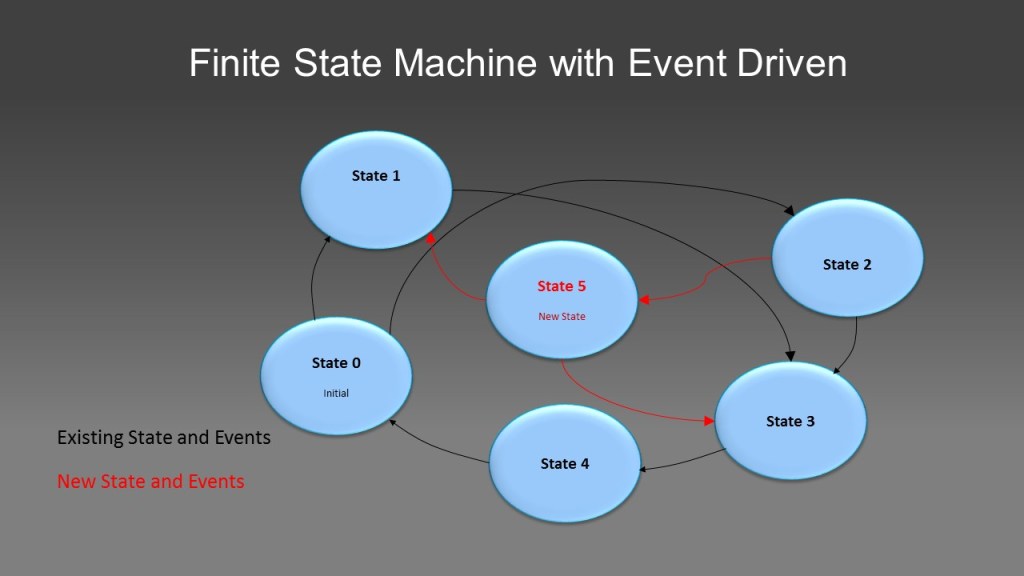
In this principle, you figure out the finite states of your software component, define the state machine and events which can cause the transition between those states and use those information to define and realize your software APIs, as shown in following diagram:

The blue color states and black arrows represent your initial software states and events, which your software can be and the events can cause state transition between those. You coded those and according state transit handling codes and are well coded, reviewed and documented. Let’s say there is a new state: state 5 and its according events are discovered or needed later, those are represented by red color. With this design principle, you just need to add this new state into your state table, add handlers to the new events and you are done. All existing codes handle existing software states and events remain unchanged and re-testing is not needed. By this way, you extend the functions of your software without impacting your existing software functions and reusing existing software functions.

This principle is also widely used in device driver, FPGA, hardware function design field.

Keyuan Zhang

Apply QoS Mechanism in Cloud Computing

When there are no enough network bandwidth resources in cloud computing infrastructure, QoS (Quality of Service) mechanism is used to achieve overall QoE (Quality of Experience), i.e. guarantee some crucial applications’ performance at the price of sacrificing some less important applications’ traffic, performance, adding delays and so on.

General QoS mechanism can be applied to cloud computing in the same way as it is applied in other use cases. Those include:

  • Packet classification
  • Marking and queuing
  • RED (Random Early Discard) queue manage algorithm
  • Scheduling principle: priority based, round robin, weighted round robin

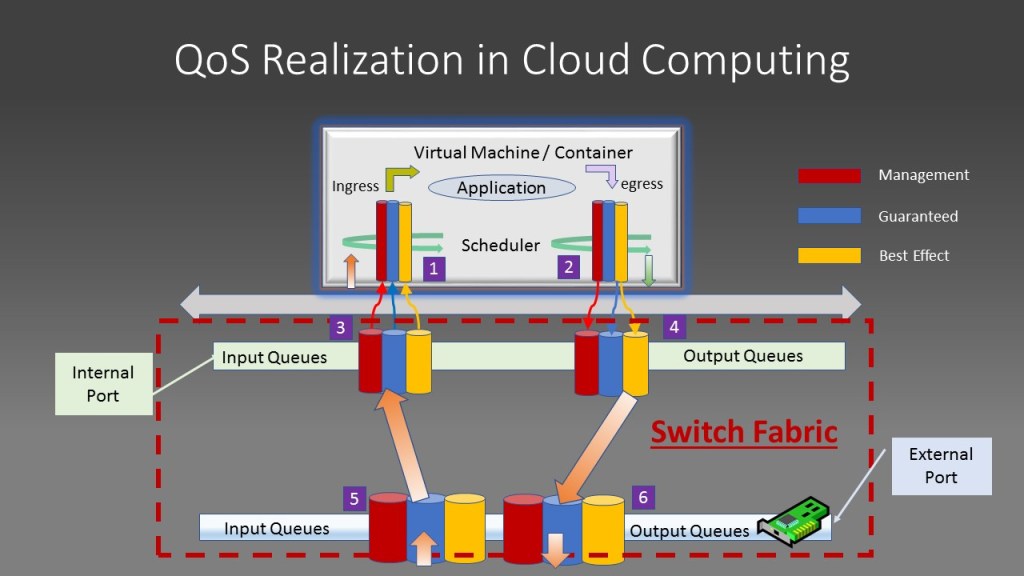
Take the scenario of deploying an application using a virtual machine in OpenStack as an example: Virtual machine hosting your application is launched on the computer node of OpenStack infrastructure. First, your virtual machine image must be able to support multiple queues in its virtual network interface on both input and output side. By this, outgoing network traffic marked by your application with different priority, through the way such as mapping packet’s DSCP field to traffic priority or for incoming traffic, which have already been marked by packets’ originating source, can be put into different queues to apply RED and scheduling principle. This can be explained by following diagram:

Here, the red queue is used to store the most critical user traffic, usually network management traffic. The blue one is used to hold guaranteed user traffic or what is called CIR (Committed Information Rate) traffic and the yellow one is used to store what is called best effort traffic which can be oversubscribed, discarded when there is not enough bandwidth to handle this portion of traffic. A packet is put into one of those three queues by looking up the marking of the incoming packet or put into a queue based on marking of outgoing traffic priority. Although more classes and queues other than three categories can be used to fine tune the networking performance, three classes of traffic and according queues are proven good enough by multiple use cases and traffic profiles.

After packets are queued accordingly, scheduler will pick up packets from different queues by way of priority based scheduling and round robin-based scheduling principle. All packets within the red queue must be served before serving any packet inside blue and yellow queues. Packets between blue and yellow queues can be served on priority based or weighted round robin based, i.e. either drain out all packets within blue one before severing any yellow one or weight based, i.e. server five packets from blue queue before serving one packet from yellow queue and so on. By using multiple queues, QoS effect is achieved and HOL (Head of Line blocking) is avoided.

The incoming and outgoing traffic from virtual machines will go through the switch fabric of the compute node in the OpenStack use case, which is normally implemented by OVS (Open Virtual Switch) or similar technologies. The switch fabric opens an internal network port for each network interface for each virtual machine attached to it. For example, port 3,4 in the above diagram. The physical network interface will also be attached to this switch fabric, for example, represented by port 4,5 in above diagram. Multiple queuing, scheduling principles will be used on all the interfaces, no matter if it is an internal port or port mapped to a physical interface card. Traffic classifying, marking, queueing, RED queue management, priority and round robin scheduling principle will be applied in the same way. 

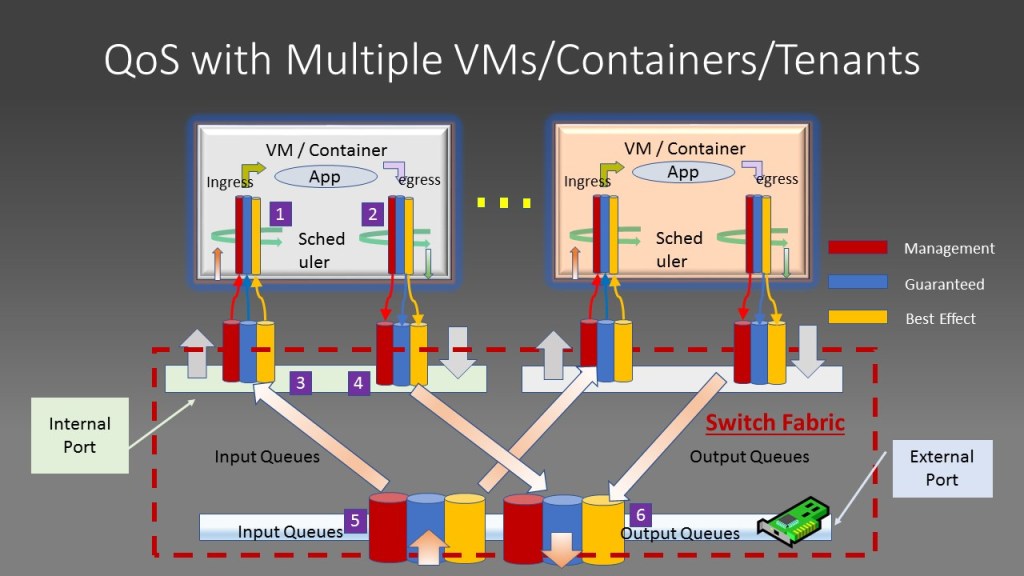
Those principles are applied in a hierarchy way: the queues of the physical interface will aggregate, queue and dequeue traffic from multiple virtual machines residing in the compute node. Same QoS principle will be applied between traffic from different virtual machine traffic sources. This is true when multiple virtual machines, multiple tenant exists within the same cluster, which is illustrated by following diagram:

Here, two virtual machines exist in the same compute node of the cluster. They can belong to the same tenant or different one. The physical port ( port 5 ,6) queues and deques traffic from different virtual machines. Some creative kind of QoS principals can be used on this aggregated interface: treat all tenant traffic equally, assign traffic weight to different tenants to mimic the service level agreement (SLA) such as platinum, gold, bronze to serve customers in differentiated ways.

Kubernetes has a similar way to enforce QoS for container based applications using traffic control features of the underlining Linux Operating System.

keyuan zhang

Use Kubernetes to deploy OpenStack

Everyone knows the pain to install or update a monolithic OpenStack release every six months. How to make this process easier? How to containerize OpenStack release itself to make it fit into modern CI/CD workflow? The solution is to use the concept of cloud over cloud i.e. use Kubernetes as under cloud, then install OpenStack as Upper cloud. Kubernetes under cloud will install containerized OpenStack components, such as Horizon, Nova, Neutron, Cinder as normal Kubernetes applications with the help of package management tools like Helm.

After the completion of such a container based installation, OpenStack will function the same way as its monolithic counterpart. Users can launch virtual machines, configure it and migrate it as normal.

Containerized Cloud over Cloud

This is not a new concept. Before using Kubernetes as under cloud to install OpenStack, projects like OOO (OpenStack over OpenStack) from OpenStack.org can install different versions of OpenStack over existing OpenStack deployment. What is new here is that the monolithic OpenStack is containerized, which means each of its function blocks such as Neutron, Nova, Glance and so on, is running from a container. Kubernetes, as the orchestrator, installs those containerized OpenStack components with help of tools and solutions such as Helm, Armada, OpenStack-Helm charts and so on to realize OpenStack installation by descriptive ways, which is well fit into modern software CI/CD development model.

This diagram illustrates this concept: First, the bare metal server is installed with Linux operating systems such as CentOS. Then, Kubernetes is installed using Ansible together with tool sets as Helm, Armada to bootstrap the server in ZTP (zero touch provision) way.

All necessary Docker images for all those tools, Kubernetes system components (etcd, kube-api, kubelet,kube-proxy and so on) are all downloaded from the available Docker registry and installed automatically.

With work with Kubernetes platform, OpenStack-Helm, which are containerized OpenStack components, are pulled from github and installed automatically. By this way, containerized OpenStack installation is finished and you will get your familiar OpenStack GUI interface as usual. Your daily operation of OpenStack can be carried on.

Industry Example

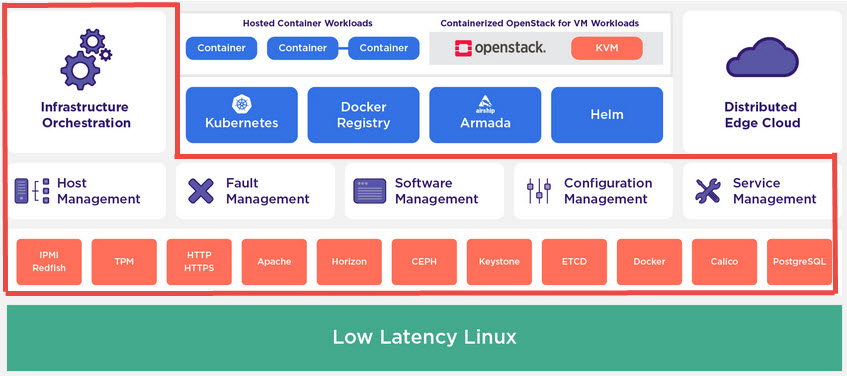
StarlingX open source Edge Cloud is one of examples utilizing this approach. it realized a common platform to host containerized, cloud native applications and OpenStack virtual machine applications with Kubernetes as orchestrator in one unified infrastructure. Its architecture is illustrated by following diagram:

More information can be obtained from https://www.starlingx.io/.

After the bare metal server is up and running, the infrastructure orchestrator takes care of whole system software installation, management and configuration. It automatically installed and configured all necessary software components: Kubernetes orchestrator system component containers, Armada and Helm Kubernetes software management tools’ containers, local docker registry to name a few. At this moment, the server is a fully functioned, Kubernetes managed, container application platform. OpenStack can then be realized by downloading a batch of Helm charts for each of its function blocks, such as Nova, Neutron, Glance, Horizon provided by the OpenStack-Helm project. After installation is finished, a working OpenStack platform is running over Kubernetes orchestrator platform. 

Due to this cloud native way of OpenStack installation, updating and upgrading your OpenStack deployment is easier, faster and being done in the same way as all other CI/CD based software development and release projects.

Keyuan Zhang