
When you put your application into Kubernetes pod and orchestrated by Kubernetes, the orchestrator provides multiple mechanisms to decide when the pod can be treated as fully out of rebooting process, the pod is functional and ready to be put into the service to accept live, application network traffic. All those are achieved by a couple of pod rebooting time control parameters, i.e. liveness and readiness probe mechanism.
The timeframe of pod boot up and come to live can be illustrated by following diagram:
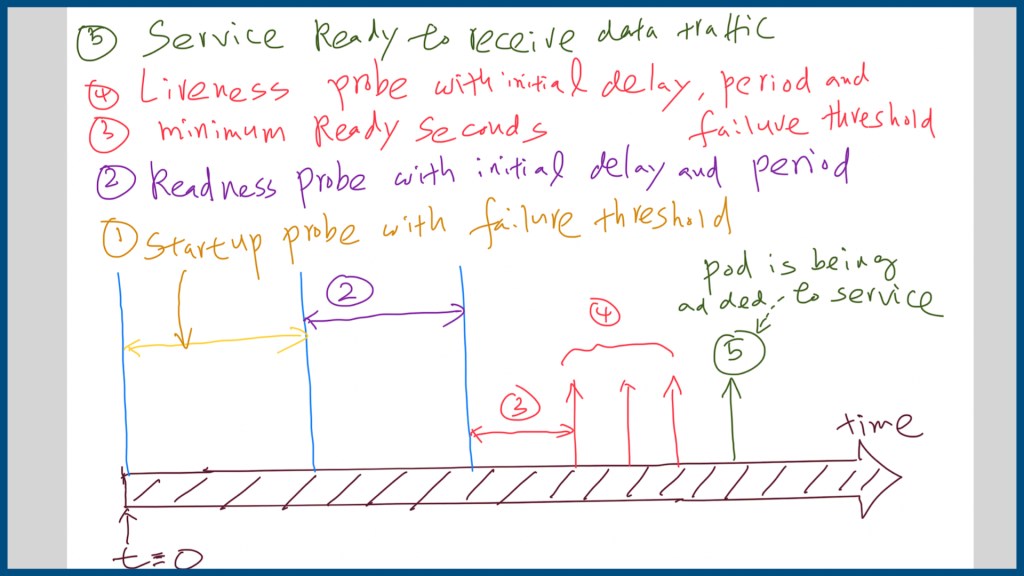
It can be divided into 5 phases and can be controlled by those parameters and probing mechanism in the pod’s yaml configuration file:
- Startup Probe with Failure Threshold: a probe to determine whether or not an application has finished its starting up procedure. The following probes will wait for this start up probe to succeed before beginning the liveness checks.
- Readiness Probe with initial delay and configurable probing period: A pod needs to pass this probe before being added to the services that match the elective label of pods by Kubernetes. Another interesting fact is that Kubernetes does not restart a pod which failed with a Readiness probe.
- Delay for pod to be thought as ready: Provide a way to give the pod more time to be kicked into the liveness probe stage.
- Pod liveness probe with initial probe delay and configurable probe period: this is the health check to determine whether the container is working or not. It is a common practice to create a /healthz endpoint for this purpose. The periodSeconds and failureThreshold parameters control how frequent the healthy check should be and after what threshold, the check is treated as failure and then triggers the restart of the pod.
- Last stage: The pod is treated as ready to be put into the according service’s pod list to receive live, application traffic.
Examples of those configuration can be illustrated by following Pod configuration yaml file:
- Provide startProbe mechanism to let other applications to query the starting status of the containerized application with snippet of manifest file as following:
startupProbe:
  enabled: True
  httpGet:
    path: /welcome.php
    port: 8000
    httpHeaders: []
  initialDelaySeconds: 30
  periodSeconds: 10
  timeoutSeconds: 5
  failureThreshold: 6
successThreshold: 1- Configure Pod’ livenessProbe and readinessProbe mechanism with according initial delay and thresholds into the pod configuration:
livenessProbe:
  enabled: true
  httpGet:
    path: /live.php
    port: 8080
    httpHeaders: []
  initialDelaySeconds: 120
  periodSeconds: 10
  timeoutSeconds: 5
  failureThreshold: 6
  successThreshold: 1
readinessProbe:
  enabled: true
  httpGet:
    path: /user.php
    port: 8089
    httpHeaders: []
  initialDelaySeconds: 30
  periodSeconds: 10
  timeoutSeconds: 5
  failureThreshold: 6
  successThreshold: 1
All those mechanisms help Kubernetes to detect a common scenario of the container in order to restart it: the process of containerized application is still running from the operating system’s point of view, but is in a stuck state and can not serve any user request.
Written by: Keyuan Zhang and thanks for the reading.
 Knowledge, Experience and Learning