
Keyuan Zhang
When you virtualized your infrastructure or applications in form of IaaS, PaaS and SaaS using virtual machine or containers, you gain a lot of benefits: easy to deploy, low CAPS, quick application deployment , load balanced based high availability, better resource utilization through sharing, open to 3rd party open sourced new technologies and so on. You also need to consider what the new environment means for your application: your application is sharing the underline cloud-based computing, networking and storage resources with an unknown number of other applications. The delay between client and server communication will be longer compared with the traditional way deployed through a dedicated hardware server.
EPA (Enhanced Platform Awareness) can help to improve the performance of crucial applications. It did this by allocating dedicated computing resources including cpu cores, memory page, cache memory, dedicated networking interface resource to the VM or container and giving the exclusive usage of those resources to those performance sensitive crucial applications. After those reservations, the rest of platform resources can be shared between other virtual machines and containers.
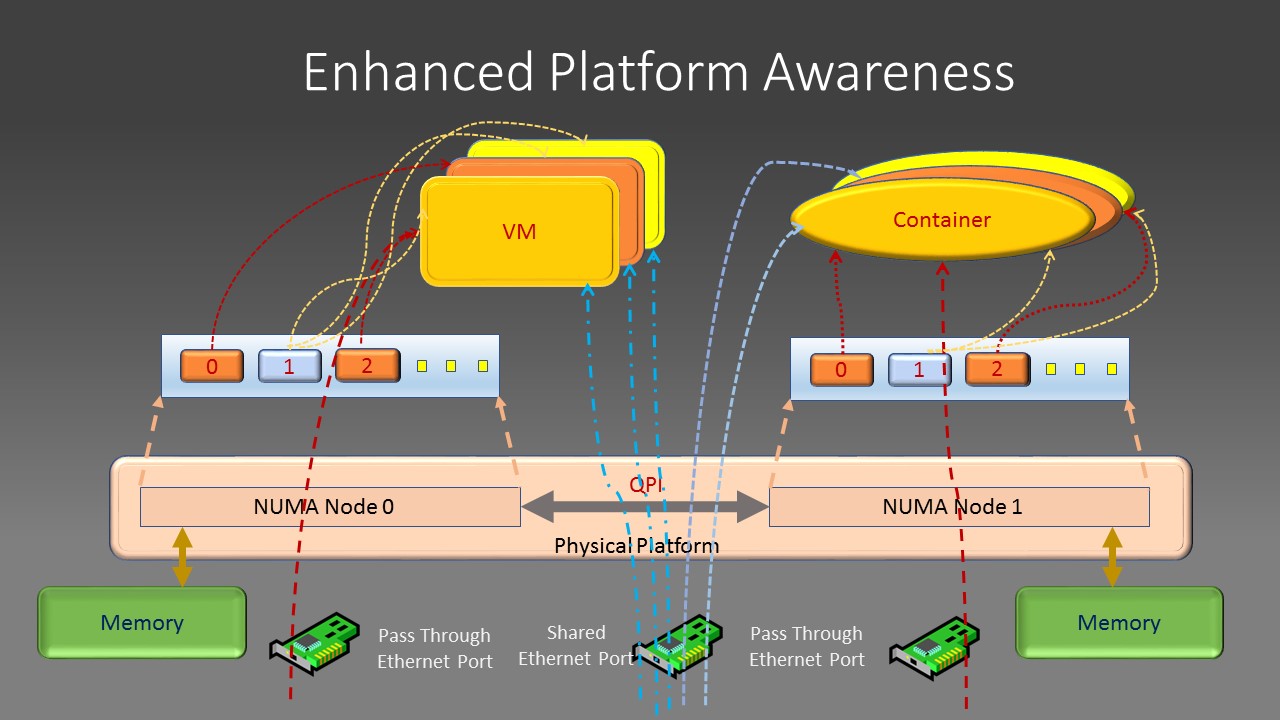
In modern Intel Xeon architecture, there are multiple CPU sockets, each with multiple cpu cores, each socket has its directly attached memory chips, PCI devices (PCI NIC card, GPU, co-processors). This is called NUMA(non-uniform Memory Architecture) in Intel’s term. EPA is realized to reserve a certain number of dedicated cpu cores to run your application and pin those cores to be co-located in the same socket where the memory, cache and network interface PCI card your application running from are all attached to the same cpu socket or NUMA node. This will give your application the best performance. Of course, applications can use resources such as memory, PCI devices attached to other CPU NUMA nodes. But, the side effect is that all data packets and memory access must go through the mesh connectors between different sockets: the QPI interface, which has capped bandwidth and this will become the performance bottom neck of your applications . The EPA principle can be illustrated by following diagrams:


By apply EPA principle, you assign dedicated CPU cores to virtual machine or container, assign dedicated memory, dedicated PCI device attached to the same cpu socket or NUNA node, passing through Ethernet card or its SR-IOV functions directly to those virtual machines or containers to guarantee the exclusive usage of those resources. You can also isolate VM or container cache allocation to avoid its content being evicted or inspected by another VM or container from both performance and security point of view.

How to achieve EPA ?
First of all, You can use following commands to find your platform’s CPU core, memory, network CPI device and its associated NUMA node information to gain a whole picture of your compute platform’s resources:
$cat /proc/cpuinfo
$lspci |grep Network
(Get Network NIC PCI Bus ID)
$cat /sys/bus/pci/devices/<NIC-PCI-Bus-ID>/numa_node
For allocating dedicated cores, memory and so on to OpenStack VM, flavor for virtual machines is used to define how many, which NUMA node the cores will come from, which cores on a specific CPU socket is used for reserved, dedicated purpose, specify the affinity requirement between virtual machine and NUMA node’s PCI devices. After that, launching a virtual machine using this flavor can guarantee those resource allocation for your virtual machine application. For example, set your OpenStack flavor as following:
openstack flavor set --property hw:cpu_policy=dedicated vm-flavor
openstack flavor set --property hw:numa_nodes=2 vm-flavor
openstack flavor set --property hw:numa_node.0=1 vm-flavor
openstack flavor set --property hw:numa_node.1=0 vm-flavor
openstack flavor set --property hw:numa_cpus.0=0 \  hw:numa_cpus.1=1,2 vm-flavor
openstack flavor set --property hw:numa_mem.0=1048576 \  hw:numa_mem.1=1048576 vm-flavor
openstack flavor set --property hw:mem_page_size=1024 vm-flavor
openstack flavor-key vm-flavor hw:pci_numa_affinity= strict
openstack flavor set vm-flavor --property "pci_passthrough:alias"="<PCI device alias name:Num of Device>"
The above flavor defined two virtual NUMA nodes. The virtual NUMA node 0 is mapped to physical NUMA node 1 and virtual NUMA node 1 is mapped to physical NUMA node 0. Virtual node 0 has one dedicated core coming from core number 0 from its underlying physical NUMA node. Virtual NUMA node 1 has two cpu cores mapped to core number 1 and 2 of the physical NUMA node. Each virtual NUMA node will have 1 Gb memory with a page size of 1024. The VM must be scheduled on NUMA cores with a direct PCI network device attached to it. The network PCI device is passed through to the VM directly when you launch the VM with command like:
openstack server create --flavor vm-flavor --image <ID of Image> <Name of VM>After cores are reserved for the virtual machine, the application running within it can check the available cores by routine like: sched_getaffinity() by code or look at the content of file: /dev/cpu and /proc/cpuinfo directory.
For containerized applications orchestrated by Kubernetes, achieving EPA is relatively easier due to the fact that Kubernetes uses a declarative way for deployment. You can use yaml file to define the desired state of your application, specify the replicate number of containers running your application, which image to run your application from, the number of cores, memory size required directly. For SR-IOV devices reserved for your application to use exclusively, you need to provision those resource first by using the “NetworkAttachmentDefinition” with a name and according parameters as following example:
apiVersion: "K8s.cni.cncf.io/v1"
kind: NetworkAttachmentDefinition
metadata:
  name: sriovi-vfio
  annotations:
    k8s.vl.cni.cncf.io/resourceName:
      intel.com/pci_sriov_net_sriov_device
spec:
  config: '{
    "cniversion": "0.3.0",
    "type": "sriov",
    "vlan": 100,
    "link_state": "disable",
    "trust": "on"
}'
During the Pod definition stage, annotation metadata will be used to attach SR-IOV resource to the pod network namespace. Application pod’s core, memory request and SR-IOV network device reservation will be specified within container’s resource definition session per following code snippet:
apiversion: apps/v1
kind: Deployment
metadata:
  name: test-deployment
  labels:
    app: test-pod
spec:
  replicas: 3
  selector:
    matchLabels:
      app: test-pod
  template:
    metadata:
      annotations:
        k8s.vi.cni.cncf.io/networks: '[
        { "name": "sriov-netdevice" }
        ]'
      labels:
        app: test-pod
   spec:
     node Selector:
       kubernetes.io/hostname: SRIOV-host
     containers:
     - name: test-pod
       image: centos/tools
       imagePullPolicy: IfNotPresent
       command: [ "/bin/bash", "-c", "--"]
       args: [ "while true; do sleep 300000; done;" ]
       resources:
         requests:
           intel.com/pci_sriov_net_sriov_device: 'l'
           memory: 10Gi
           hugepages-1Gi: 4Gi
         limits:
           intel.com/pci_sriov_net_sriov_device: '1'
           memory: 10Gi
           hugepages-1Gi: 4Gi
       volumeMounts:
       – mountPath: /mnt/huge-1048576kB
         name: hugepage
       volumes:
       - emptyDir:
         medium: Huge Pages
         name: hugepage
The above declarative Kubernetes manifest deployed three copies of your application pod running from centos image with 10G memory, 4G of 1G size of huge page and one SR-IOV backed network interface. After the container is running, the code within the container can parse /sys/fs/cgroup/cpuset/cpuset.cpus for cpu related information and check huge page and network related information as normal.
 Knowledge, Experience and Learning